Links inside PDFs: why no checker sees them and what they actually do
Google states outright that links in PDFs are treated like links in HTML, can pass PageRank, and that nofollow cannot be used inside a PDF. Yet ordinary link checkers do not see them — they look for HTML markup, which this format does not have. We go through 489 of our own PDF publications, show the three places where the link gets lost, and give a six-step checking protocol.
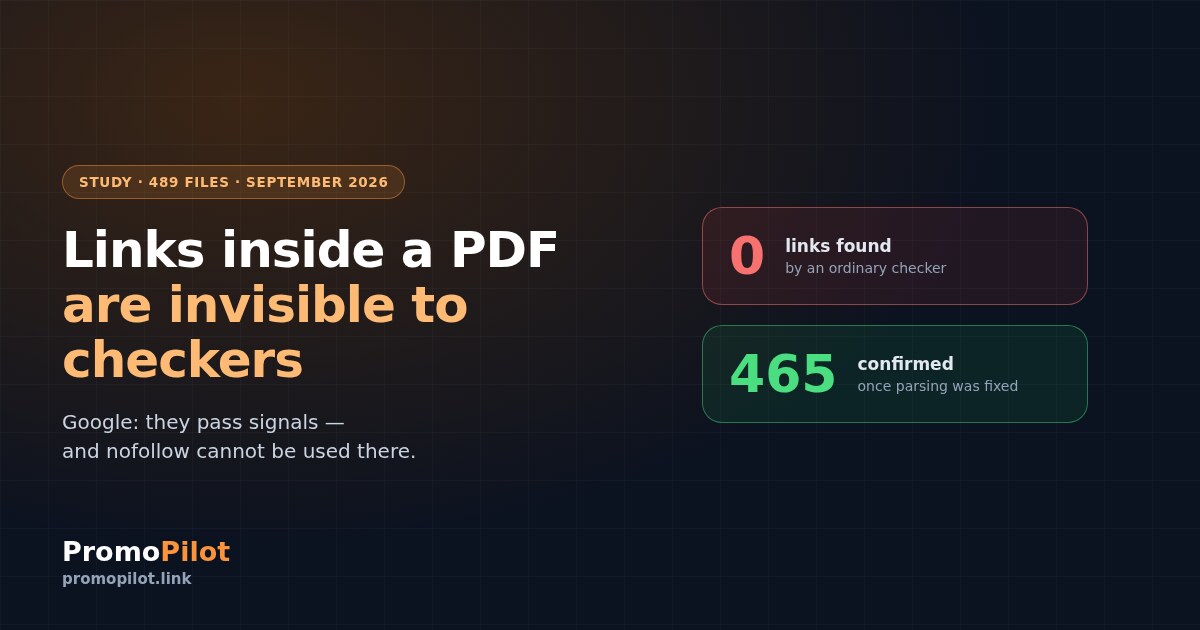
Your site gets mentioned in an industry report, a catalogue or a handbook — and all of it lives in a PDF. Does that link count? Google answered the question outright, but the answer has long been forgotten and tools do not account for it: no ordinary link checker sees what is inside a PDF. We went through 489 of our own publications in that format, found three places where the link gets lost, and show how to check such links by hand.
What Google says about links in PDFs
There is an official answer, and it is unambiguous:
"Generally links in PDF files are treated similarly to links in HTML: they can pass PageRank and other indexing signals, and we may follow them after we have crawled the PDF file. It's currently not possible to use nofollow links within a PDF document."
Google Search Central Blog, "PDFs in Google search results", 1 September 2011Note the second half of that quote. You cannot put nofollow inside a PDF — the format simply has nowhere to write it. Which means every link in an indexed PDF is open by default, and the question "what if there is a nofollow on it" does not arise here at all.
An honest caveat about age: the post is fifteen years old. It remains Google's most detailed official statement about PDFs and has not been withdrawn, but wording could have shifted since 2011 without an announcement. The verifiable part — that the format has no nofollow — does not depend on time: it is a property of PDF itself, not of policy.
Four more facts are worth taking from the same answer: Google has indexed PDFs since 2001; textual content is indexed provided the file is not password protected; images inside a PDF are not indexed; and a PDF is kept out of results with an X-Robots-Tag: noindex header, because there is no meta tag inside the file.
Why no checker sees these links
We took two live PDFs and checked them two ways: by parsing markup, the way any link checker does, and by parsing the format itself.
The result is predictable if you know how the format works and entirely unobvious if you do not. A PDF has no <a> tag — its document structure is different. A search for <a href> honestly returns zero, and the tool reports "no link" while the link is there and clickable.
Google's statement about nofollow was confirmed along the way: not a single rel attribute turned up in the files. There cannot be one.
Three places where the link gets lost
We did not work this out in theory. Our own PDF accounting was broken, and the post-mortem showed three independent causes — each of which looks like a sensible engineering decision on its own.
First: the parser looks for HTML. Second: the check for "is our text on the page" searches for a substring in the file's bytes, while PDF text sits in compressed streams and is invisible from outside. Third: the check decides "the content is not HTML, therefore this is not a page" and discards the file entirely.
The result: out of 489 of our PDF publications the system confidently counted a handful as confirmed. Once the parsing was fixed, 465 were confirmed and none were dead. The files had been alive the whole time; it was the checking that was blind.
How to extract links from a PDF
Links in a PDF are stored in annotations of type /URI. In files produced by printing from a browser they sit almost in plain text, and pulling them out needs no special libraries:
1. Download the file as is, without parsing it as HTML
2. Find constructs of the form /URI (address) in the bytes
3. If nothing turns up, decompress the streams
   (between "stream" and "endstream") and search again
4. Separately check the response header:
   is there an X-Robots-Tag with noindex
The fourth step matters no less than the first three. A PDF has no robots meta tag, so the only way to close the file to indexing is the server response header. And the only way to check it is to look at the headers, not at the content.
A checking protocol: six steps
Confirm the file is served
Request the address and look at the response code and Content-Type. A normal answer is 200 and application/pdf. If HTML came back you downloaded a wrapper page rather than the file itself, and checking further is pointless.
application/pdf, and a file size that looks like a document rather than an error page.Check the X-Robots-Tag header
This is the one place where a PDF gets closed to indexing. There is no meta tag inside the file, so if the headers carry noindex, the file will not enter the index — and a link from it will give you nothing.
noindex there.Find the link in the annotations
Look for /URI constructs with an address. If nothing turns up, decompress the streams and try again — some files keep their annotations inside them.
If it is still empty while the document visibly shows a link, it is most likely just text typed out as an address, with no active annotation. Something like that is a "link" only to a human.
Do not look for rel — it is not there
A step that saves time: a PDF has no nofollow mechanism. If the link exists in an annotation and the file is indexable, the question of whether it is open is settled by the format itself.
Confirm the text can be extracted at all
Google indexes the textual content of a PDF. The simplest check is to open the file and try selecting and copying the text. If it copies, a search engine will read it too. If it is a picture of a page, the content depends on recognition and should not be counted on.
Be patient
This is the least pleasant part. In our data, PDFs published in November and December 2025 first appeared in a third-party backlink index in September 2026 — roughly nine months later.
A caveat is mandatory: that is one commercial service's index rather than Google's, and a single observation does not make a pattern. But the order of magnitude is worth remembering: weeks is not the unit here.
What we saw in our data — and what we did not
Once the accounting was fixed we lined up the dates. In September 2026 a backlink index went through our PDF donors published almost a year earlier for the first time, and in the same window six client domains saw their domain authority score rise noticeably — from low single digits to 17–21.
Here we should stop and say the part that usually goes unsaid. This is a coincidence in timing, not proof. An authority score is a third-party metric rather than Google's, and it rises exactly when that service discovers new links. A connection to rankings and traffic does not follow from it.
The strongest support for that doubt is a counterexample from the same sample: one domain has sixteen live PDFs with links — and zero movement. If the mechanism were direct, the effect would show there too.
What can honestly be taken from this: links in PDFs exist, are indexed and are counted by backlink indexes. How much they influence rankings does not follow from our data, and we are not going to claim it.
What not to do
In short
Google states outright that links in PDFs pass signals the same way ordinary ones do, and that nofollow cannot be placed inside a PDF. Meanwhile ordinary checkers do not see them — they look for HTML markup, which does not exist in this format. We found three independent places where such a link gets lost, and at first counted almost all of our 489 PDF publications as unconfirmed.
If you do one thing: take any PDF that links to you and search its bytes for /URI. It takes a minute, and the result may differ from what your tool reports.
The crawl shows what keeps your pages out of the index.
Frequently asked questions
Do links in PDFs pass weight?
By Google's official answer, links in PDFs are treated similarly to links in HTML: they can pass PageRank and other indexing signals, and Google may follow them after crawling the file. The condition is the same as for ordinary pages: the file has to be reachable and not closed to indexing.
Can you put nofollow in a PDF?
No. Google states outright that it is not possible to use nofollow links within a PDF document, and this is a property of the format itself: there is no place for such an attribute in it. In our checks not a single rel attribute turned up in a PDF.
Why does a link checker not see a link in a PDF?
Because it looks for markup tags, and a PDF has none — its document structure is different. Links are stored in annotations of the URI type. Until the tool parses the format itself, it will return zero regardless of the content.
How do you close a PDF to indexing?
Only with an X-Robots-Tag response header carrying noindex. There is no robots meta tag inside a PDF, so the familiar approach for HTML pages does not work here.
Are images inside a PDF indexed?
By the same Google answer, no — images inside PDFs are not indexed. For images to take part in search they need to sit on ordinary pages.
How long until a link in a PDF has an effect?
It is never fast. In our case about nine months passed between publishing the files and their first appearance in a third-party backlink index. That is one observation rather than a rule, but plan in months.
Sources
Google Search Central Blog, "PDFs in Google search results", 1 September 2011, by Gary Illyes: how links in PDFs are treated, the impossibility of nofollow, text indexing, images inside PDFs, and closing files with X-Robots-Tag.
PromoPilot's own measurement, 24 September 2026: a live check of PDF publications comparing markup parsing with format parsing, response codes and headers.
PromoPilot's own data: 489 publications in PDF format between 31 October 2025 and 18 September 2026; after the parsing fix 465 were confirmed and none left unconfirmed.